Unlock Realistic Anime Portraits: A Comprehensive Workflow for AI Enthusiasts
Unlock photorealistic anime portraits with this workflow! Convert 2D images with automatic face/hand refinement using AI models. Learn how to use ComfyUI for stunning results
- Models
- Controlnet
- Key Nodes
- FaceDetailerControlnetUpscaler
- VRAM
- Medium VRAM (12–16GB)
- Reading Time
- 3 min
Workflow Overview
Unlock photorealistic anime portraits with this workflow! Convert 2D images with automatic face/hand refinement using AI models. Learn how to use ComfyUI for stunning results
Content type: Workflow
Primary intent: Download
Required Models
- Controlnet
Required Nodes
- FaceDetailer
- Controlnet
- Upscaler
Setup Notes
- Install the required models before opening the workflow template.
- Recommended hardware: Medium VRAM (12–16GB).
- Use the download button above to import the workflow JSON into ComfyUI.
1. Workflow Overview
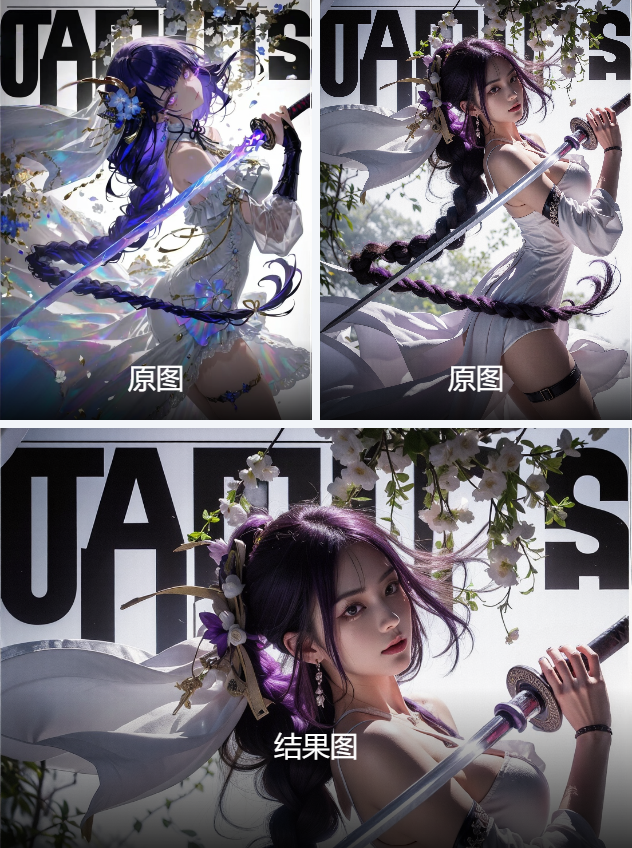
Purpose: Convert anime/2D images into photorealistic portraits with automatic face/hand refinement.
Core Models:
majicMIX realistic v7: Base photorealism modelControlNet (Canny): Preserve original compositionUltralyticsDetector (YOLOv8): Face/body detectionESRGAN_4x: Image upscaling
2. Key Nodes
Node Name | Function | Installation |
|---|---|---|
| Auto-refine facial features | Via ComfyUI Manager |
| Extract line art for ControlNet | Manual install |
| Auto-tag input image content | Install |
| Detail enhancement | Download model manually |
3. Workflow Structure
Group 1: Input Processing
Input: Anime image (e.g.,
initial_song.jpg)Output: Line art + tags (
blue_hair, dress, etc.)
Group 2: Image Generation
Uses ControlNet with
KSamplerAdvanced(40 steps, Euler, CFG=8)
Group 3: Refinement
FaceDetailerfor face/hands (manual mask editing available)
Group 4: Upscaling
2x ESRGAN upscale to ≥2048px
4. Input/Output
Inputs:
Image: Recommended 1024x1536px
Negative prompt: Auto-includes
(worst quality:2), lowres
Output: PNG portrait saved to
ComfyUI/output
5. Notes
VRAM: ≥12GB required (peak usage during refinement)
Dependencies:
SAM model
sam_vit_b_01ec64.pthinmodels/samChinese prompts auto-translated via
BaiduTranslateNode
Troubleshooting:
Line art failure → Adjust image contrast
Distorted hands → Enable
Hand Repair Componentgroup