Mastering Lighting in Portraits: An ICLight Tutorial for ComfyUI
Unlock realistic portrait lighting with ICLight technology! Learn how to redirect lighting using ComfyUI and achieve stunning results. Get started now!
Workflow Overview
Unlock realistic portrait lighting with ICLight technology! Learn how to redirect lighting using ComfyUI and achieve stunning results. Get started now!
Content type: Workflow
Primary intent: Download
Required Models
- Sd
Setup Notes
- Install the required models before opening the workflow template.
1. Workflow Overview
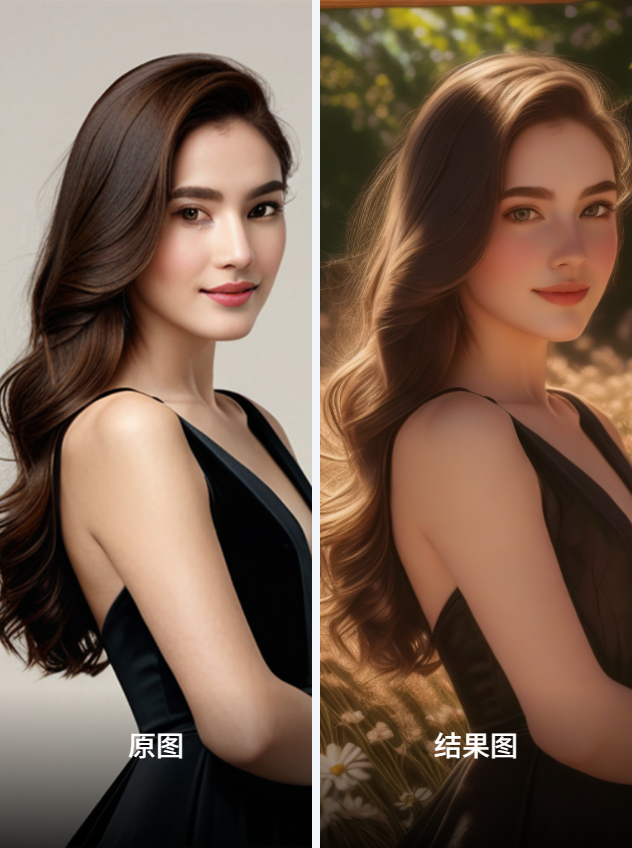
Purpose: Redirect lighting in realistic portraits using ICLight technology.
Core Models:
ChilloutMix-Ni: Base photorealism modeliclight_sd15_fcon.safetensors: ICLight-specific UNet for light control
2. Key Nodes
Node Name | Function | Installation |
|---|---|---|
| Load ICLight control model | Download to |
| Inject lighting conditions | Bundled with ICLight plugin |
| Image-latent conversion | Built-in ComfyUI |
3. Workflow Structure
Input Phase:
Load image (e.g.,
untitled-11.jpg)Convert to latent via
VAEEncode
Lighting Control:
Set light weight in
ICLightConditioning(default=0.18215)Positive prompt:
"Masterpiece,8K,Highly Detailed portrait"
Generation:
KSampler(30 steps, Euler Ancestral) renders final image
4. Input/Output
Inputs:
Image: 768x1024 recommended
Light intensity: Adjust via
ICLightConditioningslider (0-1)
Output: Real-time preview in ComfyUI
5. Notes
Dependencies:
Required model:
iclight_sd15_fcon.safetensors(~2GB)Base model must be SD1.5-compatible (e.g.,
ChilloutMix)
Troubleshooting:
Weak lighting effects → Increase
ICLightConditioningweightArtifacts → Reduce CFG scale (current=7)