Unleash AI-Powered Video Character Redraw: Transforming Videos with Style
Unlock AI-powered video character redrawing with Wan2.1Fun! Discover how this workflow leverages Stable Diffusion, GroundingDino, and Openpose to transform characters into stylized images and videos. Learn more and elevate your video editing skills!
- Use Case
- Video
- Best For
- Video
- Models
- Wan2.1ControlnetSd
- Key Nodes
- Controlnet
- VRAM
- Medium VRAM (12–16GB)
- Reading Time
- 4 min
Workflow Overview
Unlock AI-powered video character redrawing with Wan2.1Fun! Discover how this workflow leverages Stable Diffusion, GroundingDino, and Openpose to transform characters into stylized images and videos. Learn more and elevate your video editing skills!
Content type: Workflow
Primary intent: Download
Required Models
- Wan2.1
- Controlnet
- Sd
Required Nodes
- Controlnet
Setup Notes
- Install the required models before opening the workflow template.
- Recommended hardware: Medium VRAM (12–16GB).
1. Workflow Overview
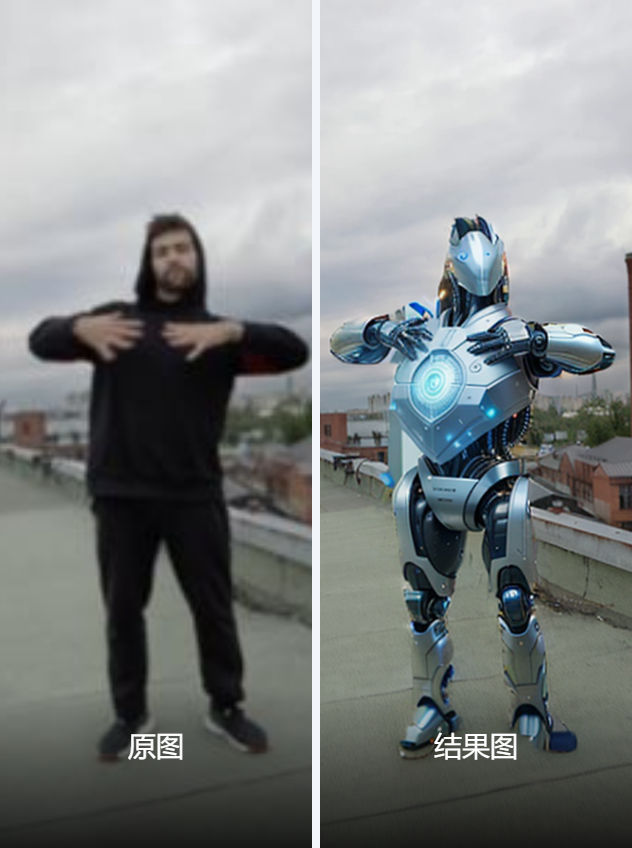
This workflow, named “wan2.1Fun_Video Character Redraw”, converts characters in a video into stylized images or videos using AI models. Key technologies include:
Frame Extraction: Extracts key frames from input video.
Segmentation & Pose Detection: Uses GroundingDino+SAM for person segmentation and Openpose for pose keypoints.
Text/Image-Guided Generation: Generates new content via Stable Diffusion (Wan2.1-Fun-Control).
Video Synthesis: Combines frames into a final video.
2. Core Models
Stable Diffusion (Wan2.1-Fun-Control-14B)
Purpose: Generates high-quality images/videos from text/image prompts.
Model File:
Wan2.1-Fun-Control-14B_fp8_e4m3fn.safetensors.
GroundingDino + SAM
Purpose: Detects and segments characters (e.g.,
manlabel).Model Files:
GroundingDINO_SwinT_OGC,sam_vit_b_01ec64.pth.
ControlNet (Openpose)
Purpose: Preserves original pose structure.
Model File:
control_v11p_sd15_openpose.pth.
Florence2
Purpose: Auto-generates image captions (prompt inversion).
Model File:
Florence-2-large.
3. Key Nodes
Video Input:
VHS_LoadVideo: Loads video files (e.g.,2795746-uhd_2160_3840_25fps.mp4).
Character Processing:
GroundingDinoSAMSegment: Segments characters and generates masks.OpenposePreprocessor: Extracts pose keypoints.
Generation Control:
WanVideoTextEncode: Processes text prompts (e.g., "futuristic robot").WanVideoSampler: Controls sampling (steps=25, CFG=8).
Output Synthesis:
VHS_VideoCombine: Combines frames into MP4 (H.264).
4. Workflow Structure (Groups)
Frame Redraw (Text-Based)
Input: Video + text prompts.
Output: Redrawn first frame.
Wan2.1 Character Conversion
Input: Masks + pose data.
Output: Stylized video.
Prompt Inversion (Florence2)
Input: Reference image.
Output: Auto-generated detailed caption.
5. Inputs & Outputs
Inputs:
Video file (MP4).
Optional text prompts.
Generation params (512x910, Euler sampler).
Output:
Generated video (e.g.,
AnimateDiff_00027.mp4).
6. Notes
Dependencies:
Install via ComfyUI Manager:
ComfyUI-WanVideoWrapper(video generation).comfyui_controlnet_aux(pose extraction).comfyui-florence2(prompt inversion).
Hardware:
Recommended VRAM ≥12GB (Wan2.1 model is large).
Troubleshooting:
Model path errors: Verify
.safetensorsfile locations.Video encoding issues: Adjust CRF in
VHS_VideoCombine(default=19).