Unlock 3D Magic: A Step-by-Step Workflow for Converting 2D Line Art
Transform 2D line art into stunning 3D images with this workflow, featuring ControlNet and depth map generation. Learn how to upscale to HD and enhance your artwork.
- Models
- ControlnetLoraSd
- Key Nodes
- ControlnetUpscaler
- VRAM
- Low VRAM (≤8GB)
- Reading Time
- 4 min
Workflow Overview
Transform 2D line art into stunning 3D images with this workflow, featuring ControlNet and depth map generation. Learn how to upscale to HD and enhance your artwork.
Content type: Workflow
Primary intent: Download
Required Models
- Controlnet
- Lora
- Sd
Required Nodes
- Controlnet
- Upscaler
Setup Notes
- Install the required models before opening the workflow template.
- Recommended hardware: Low VRAM (≤8GB).
1. Workflow Overview
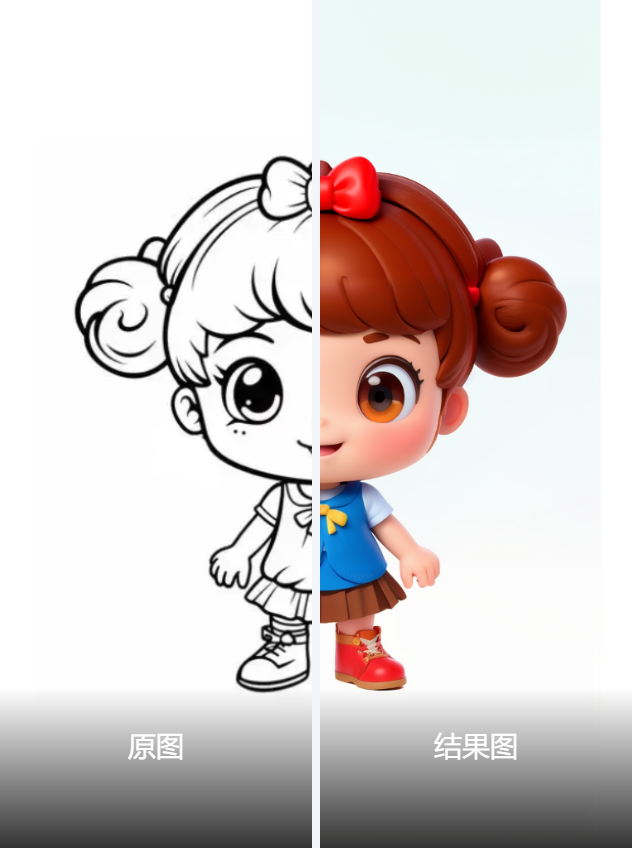
This workflow converts 2D line art into 3D-styled images using ControlNet for sketch control and depth map generation, with tile-based upscaling for HD output. Key stages:
Line art preprocessing → 3D style generation → Depth map control → Upscaling
2. Core Models
Model Name | Function |
|---|---|
3DMix.fp16 | Stable Diffusion 1.5 fine-tuned for 3D cartoon rendering. |
ControlNet-lineart | Controls sketch structure ( |
ControlNet-depth | Enhances 3D depth ( |
4x-UltraSharp | Image super-resolution model ( |
3. Key Nodes
Node Name | Purpose | Installation |
|---|---|---|
AIO_Preprocessor | Preprocesses line art/depth maps (supports | Via ComfyUI Manager. |
ControlNetApplyAdvanced | Dual-ControlNet integration (lineart + depth). | Built-in. |
UltimateSDUpscale | Tile-based upscaling to avoid VRAM overflow. | Manual install from GitHub. |
WD14Tagger | Auto-tags input images to assist prompt generation. | Install via |
Dependencies:
LoRA: Download
zhidiao.safetensors(3D style enhancer) tomodels/loras.Note: Model links are provided in the workflow note (from liblib.art).
4. Workflow Structure
Group Name | Function | Input/Output |
|---|---|---|
Model Loading | Loads 3D base model, ControlNets, and LoRA. | Input: Model paths / Output: Initialized models. |
ControlNet | Processes line art and depth maps in parallel. | Input: Sketch image / Output: Conditioning. |
Tagging | Generates tags via WD14Tagger and combines with manual prompts. | Input: Image / Output: Combined prompts. |
Sampling | Generates 3D images using KSampler (default: 28 steps, Euler). | Input: Conditioning / Output: Latent. |
Upscaling | Performs UltimateSDUpscale (2x) with tile-based processing. | Input: Low-res image / Output: HD image. |
5. Inputs & Outputs
Input Parameters:
Image: Upload line art via
LoadImagenode (supports.webp).Prompt: Default style is
clay character(editable viaCR Textnode).Resolution: Preprocessing fixed at 768x768; final output depends on upscale settings.
Output:
Saved as PNG (via
SaveImagenode) toComfyUI/output.
6. Notes
VRAM: ≥8GB GPU recommended (upscaling is VRAM-intensive).
Preprocessors:
Use
AnimeLineArtPreprocessorfor sketches.Use
DepthAnythingV2Preprocessorfor depth maps.
Debugging: If ControlNet fails, verify model filenames match the JSON.