From Photos to Masterpieces: Automating Line Art Conversion with AI
Transform images into stunning line art with ControlNet, LoRA models, and facial refinement. Discover how this workflow automates image conversion and enhances facial details. Learn more!
- Models
- ControlnetLoraSd
- Key Nodes
- FaceDetailerControlnet
- VRAM
- Low VRAM (≤8GB)
- Reading Time
- 3 min
Workflow Overview
Transform images into stunning line art with ControlNet, LoRA models, and facial refinement. Discover how this workflow automates image conversion and enhances facial details. Learn more!
Content type: Workflow
Primary intent: Download
Required Models
- Controlnet
- Lora
- Sd
Required Nodes
- FaceDetailer
- Controlnet
Setup Notes
- Install the required models before opening the workflow template.
- Recommended hardware: Low VRAM (≤8GB).
🛠️ Workflow Overview
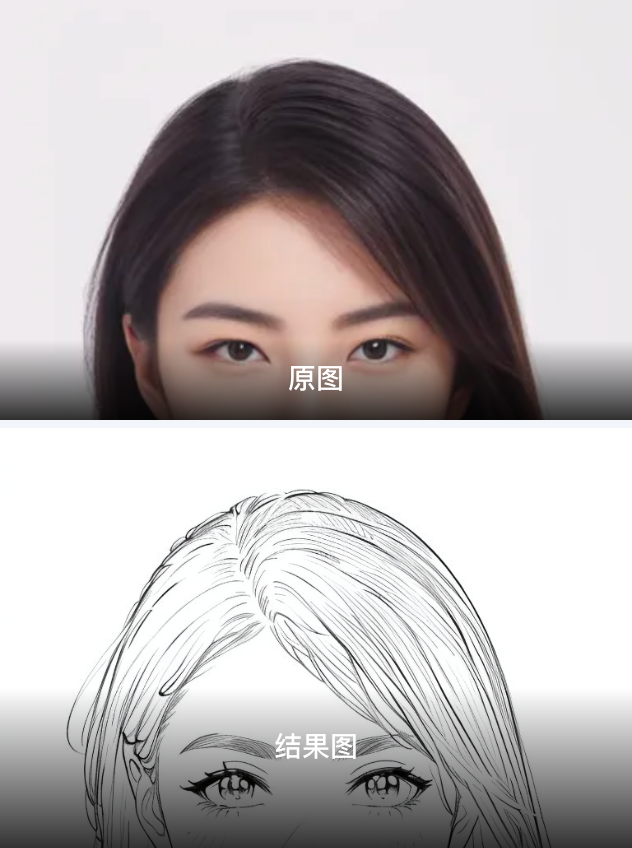
Purpose and Function: This workflow automatically converts images to line art style using ControlNet, LoRA models, and image refinement techniques. It processes images into a clean line art output and enhances facial details.
Core Features:
Line Art Extraction: Uses ControlNet + line art models to convert the image.
Facial Refinement: Enhances facial details using FaceDetailer.
Image Preview & Save: Displays and saves the final line art image.
🔥 Core Models
Lineart_v1.1
Function: Main model responsible for line art transformation.
Installation:
Download the
.safetensorsmodel and place it inmodels/Stable-diffusion.
ControlNet
Model:
control_v11p_sd15_lineartFunction: Guides the line art generation.
Installation:
Place models in
models/ControlNet.
LoRA model: lineart_1.0
Function: Enhances line art quality.
Installation:
Place the model in
models/Lora.
⚙️ Nodes Explanation
LoadImage: Upload image.
ImageResize+: Resize the image.
LineArtPreprocessor: Extract line art.
FaceDetailer: Enhance facial details.
PreviewImage & SaveImage: Display and save the output.
🔥 Inputs & Outputs
✅ Inputs:
Uploaded image.
ControlNet and LoRA models.
Face refinement settings.
✅ Outputs:
Final line art image.
Enhanced facial details.
⚠️ Considerations
Hardware Requirements: Use GPU with ≥8GB VRAM.
Compatibility: Ensure model and ComfyUI versions match.
Resolution: Keep image size at 1024x1024 or lower for efficiency.