Unleash Artistic Potential: Leveraging Flux.1 for Hand-Drawn Watercolor Images
Unlock artistic image generation with Flux.1! Discover how to transform photos into stunning hand-drawn watercolor-style images with depth control and AI-powered prompts. Learn more and create your own masterpieces!
- Models
- FluxControlnetLora
- Key Nodes
- ControlnetUpscaler
- VRAM
- Medium VRAM (12–16GB)
- Reading Time
- 11 min
Workflow Overview
Unlock artistic image generation with Flux.1! Discover how to transform photos into stunning hand-drawn watercolor-style images with depth control and AI-powered prompts. Learn more and create your own masterpieces!
Content type: Workflow
Primary intent: Download
Required Models
- Flux
- Controlnet
- Lora
Required Nodes
- Controlnet
- Upscaler
Setup Notes
- Install the required models before opening the workflow template.
- Recommended hardware: Medium VRAM (12–16GB).
Workflow Overview
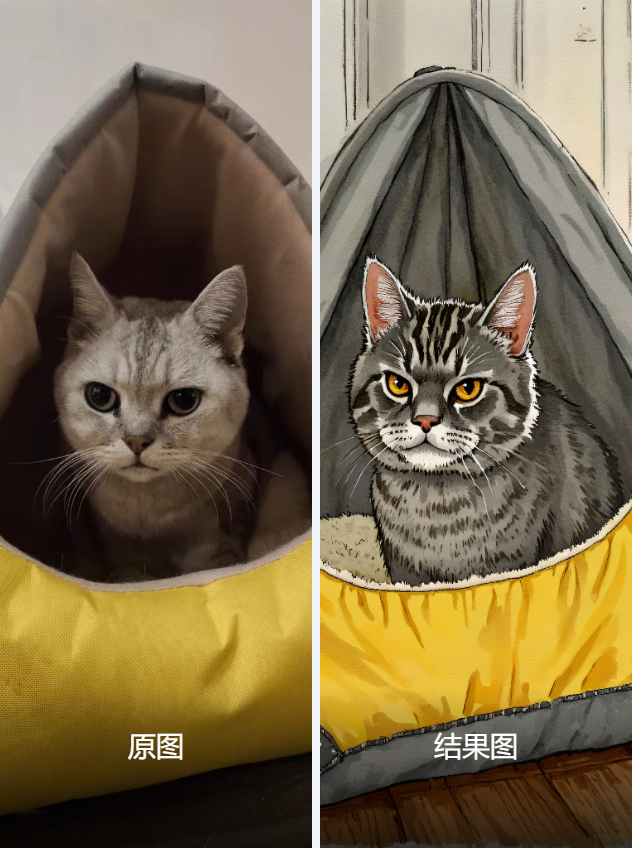
This workflow’s primary purpose is to leverage the Flux.1 model and depth control techniques to generate high-quality artistic-style images (hand-drawn watercolor) from an input image, enhanced by Joy2 captioning to derive descriptive prompts. The specific goals are:
Image Processing and Generation: Generate a 1024x1024 artistic-style image based on the input image (20230304185125_b966e.jpg).
Depth Control: Use the DepthAnythingV2 model to extract depth information and guide generation via ControlNet.
Prompt Optimization: Utilize the Joy_caption_two node to reverse-engineer detailed descriptive text from the input image, combined with predefined prompts for final generation. This workflow is suitable for art creation, image stylization, or generating hand-drawn effects from photos.
Core Models
Flux.1 (基础算法_F.1)
Function: An efficient text-to-image model supporting high-resolution generation, ideal for artistic-style images.
Source: Download from Civitai or official repositories, place in ComfyUI/models/checkpoints/, e.g., 基础算法_F.1_fp8_e4m3fn.safetensors.
DepthAnythingV2 (depth_anything_v2_vitl_fp32.safetensors)
Function: Extracts depth information from images for ControlNet guidance, enhancing spatial structure.
Source: Automatically downloaded via DownloadAndLoadDepthAnythingV2Model, stored in ComfyUI/models/.
Lora Model (姑苏_F.1-手绘水彩风萌宠_V1.0)
Function: Fine-tunes the Flux.1 model to generate hand-drawn watercolor-style pet images.
Source: Download from Civitai or custom Lora repositories, place in ComfyUI/models/loras/.
Upscale Model (4x-UltraSharp)
Function: Upscales generated images to enhance details.
Source: Download from ComfyUI model library, place in ComfyUI/models/upscale_models/.
Component Explanation
Below are the key nodes in the workflow, including their purpose, function, and installation method, along with dependencies:
Joy_caption_two_load
Purpose: Loads the Joy2 pipeline for image captioning.
Function: Outputs a JoyTwoPipeline object, processed with the Llama 3.1 model.
Installation: Requires the JoyCaption plugin, install via ComfyUI Manager (search “JoyCaption”) or GitHub (https://github.com/comfyanonymous/ComfyUI_JoyCaption).
Dependencies: Requires unsloth/Meta-Llama-3.1-8B-Instruct-bnb-4bit model, download and place in ComfyUI/models/joy_caption/.
Joy_caption_two
Purpose: Generates descriptive text from input images.
Function: Outputs a detailed string (e.g., describing image content), supports Descriptive mode with a max length of 150 characters.
Installation: Shares plugin with Joy_caption_two_load.
Dependencies: Requires JoyTwoPipeline.
ttN concat
Purpose: Concatenates multiple text strings.
Function: Merges predefined text (e.g., “Hand-drawn watercolor illustration”) with Joy2-generated descriptions.
Installation: Requires ttN Nodes plugin, install via ComfyUI Manager (search “ttN”) or GitHub (https://github.com/ttN-ComfyUI/ttN_nodes).
ShowText|pysssss
Purpose: Displays and passes text content.
Function: Shows Joy2-generated descriptions or merged text.
Installation: Built into ComfyUI, no additional setup needed.
LoadFluxControlNet
Purpose: Loads a Flux-compatible ControlNet model.
Function: Outputs a FluxControlNet object for depth control.
Installation: Requires XLabs plugin, install via ComfyUI Manager (search “XLabs”) or GitHub (https://github.com/XLabs-AI/ComfyUI-XLabs).
Dependencies: Requires XLabs-flux-depth-controlnet_v3 file, download and place in ComfyUI/models/controlnet/.
ApplyFluxControlNet
Purpose: Applies ControlNet depth control.
Function: Combines depth maps to generate conditioning, enhancing structure.
Installation: Shares plugin with LoadFluxControlNet.
Dependencies: Requires depth map input.
DownloadAndLoadDepthAnythingV2Model
Purpose: Downloads and loads the DepthAnythingV2 model.
Function: Automatically retrieves the depth model for use.
Installation: Requires DepthAnything plugin, install via ComfyUI Manager (search “DepthAnything”) or GitHub (https://github.com/comfyanonymous/ComfyUI_DepthAnything).
DepthAnything_V2
Purpose: Generates depth maps from input images.
Function: Outputs depth images for ControlNet use.
Installation: Shares plugin with DownloadAndLoadDepthAnythingV2Model.
Dependencies: Requires depth_anything_v2_vitl_fp32.safetensors.
ImageResize+
Purpose: Resizes input images.
Function: Adjusts the image to 1024x1024, maintaining proportions.
Installation: Built into ComfyUI.
DualCLIPLoader
Purpose: Loads CLIP models.
Function: Outputs CLIP objects for text encoding.
Installation: Built into ComfyUI.
Dependencies: Requires clip_l and t5xxl_fp16 files, place in ComfyUI/models/clip/.
UNETLoader
Purpose: Loads the Flux.1 UNET model.
Function: Outputs a model object to drive generation.
Installation: Built into ComfyUI.
Dependencies: Requires 基础算法_F.1_fp8_e4m3fn file.
LoraLoader
Purpose: Loads a Lora model.
Function: Fine-tunes the model for hand-drawn watercolor style.
Installation: Built into ComfyUI.
Dependencies: Requires 姑苏_F.1-手绘水彩风萌宠_V1.0 file.
EmptyLatentImage
Purpose: Creates an initial latent image.
Function: Provides a 1024x1024 latent space for generation.
Installation: Built into ComfyUI.
XlabsSampler
Purpose: Performs sampling for generation.
Function: Combines model, conditioning, and ControlNet to generate latent images.
Installation: Requires XLabs plugin.
VAEDecode
Purpose: Decodes latent images into pixel images.
Function: Outputs the generated image.
Installation: Built into ComfyUI.
Dependencies: Requires ae.sft VAE file.
UpscaleModelLoader
Purpose: Loads an upscale model.
Function: Outputs an upscale model object.
Installation: Built into ComfyUI.
ImageUpscaleWithModel
Purpose: Upscales the generated image.
Function: Increases the 1024x1024 image to a higher resolution.
Installation: Built into ComfyUI.
SaveImage
Purpose: Saves the generated image.
Function: Outputs the file to a specified path.
Installation: Built into ComfyUI.
Image Comparer (rgthree)
Purpose: Compares original and generated images.
Function: Offers a slide comparison mode to show input-output differences.
Installation: Requires rgthree plugin, install via ComfyUI Manager (search “rgthree”) or GitHub (https://github.com/rgthree/rgthree-comfy).
Workflow Structure
Joy2 Reverse Prompt Group
Role: Generates descriptive text from the input image to optimize prompts.
Input Parameters: Input image (20230304185125_b966e.jpg), mode (Descriptive), length (150).
Output: Detailed descriptive text (e.g., panda description paragraph).
Depth Control Group
Role: Extracts depth information and applies ControlNet guidance.
Input Parameters: Input image, depth model (depth_anything_v2_vitl_fp32.safetensors), ControlNet weight (0.8).
Output: Depth map and ControlNet conditioning.
Image Generation Group
Role: Executes image generation and post-processing.
Input Parameters: Latent image (1024x1024), positive prompt (merged text), negative prompt (“Worst quality, blurry, wrong, ugly”), Lora weight (1.2), guidance scale (3.5), sampling steps (20).
Output: Generated image (initial 1024x1024, upscaled).
Inputs and Outputs
Expected Inputs:
Image: 20230304185125_b966e.jpg (initial resolution 979x923).
Resolution: 1024x1024.
Seed: 722511220491392 (randomizable).
Prompt: Dynamically generated (including “Hand-drawn watercolor illustration”).
Negative Prompt: “Worst quality, blurry, wrong, ugly”.
Lora Weight: 1.2.
Guidance Scale: 3.5.
Sampling Steps: 20.
Final Output:
High-quality artistic-style image (PNG format, upscaled beyond 1024x1024).
Comparison file (saved via Image Comparer).
Notes and Tips
Resource Requirements: Flux.1 and Lora generation require 12GB+ VRAM; an NVIDIA GPU is recommended.
Model Files: Ensure 基础算法_F.1_fp8_e4m3fn, ae.sft, and Lora files are in the correct paths, or errors will occur.
Plugin Installation: Install JoyCaption, XLabs, DepthAnything, and rgthree plugins, or nodes will be unavailable.
Performance Optimization: Reduce sampling steps (20→10) or resolution (1024→512) for faster generation.
Compatibility: ComfyUI version should be 0.3.18 or higher, with plugins compatible with Flux.1.
Input Image: Ensure 20230304185125_b966e.jpg exists in the specified path.
Example Illustration
Suppose the input image is a panda photo; the workflow will:
Reverse-engineer a description: “This photograph captures a large, adorable panda...”.
Merge prompt: “Hand-drawn watercolor illustration, This photograph...”.
Generate a hand-drawn watercolor-style panda image, upscaled and saved as ComfyUI.png.