Convert Sketches to Stunning Art: A Step-by-Step Guide
Transform sketches into stunning illustrations with the Doodle Art Master workflow! Learn how to use AI models to add color, detail, and style to your artwork. Get started now and elevate your art!
- Models
- SdxlControlnet
- Key Nodes
- ControlnetUpscaler
- VRAM
- Low VRAM (≤8GB)
- Reading Time
- 2 min
Workflow Overview
Transform sketches into stunning illustrations with the Doodle Art Master workflow! Learn how to use AI models to add color, detail, and style to your artwork. Get started now and elevate your art!
Content type: Workflow
Primary intent: Download
Required Models
- Sdxl
- Controlnet
Required Nodes
- Controlnet
- Upscaler
Setup Notes
- Install the required models before opening the workflow template.
- Recommended hardware: Low VRAM (≤8GB).
1. Workflow Overview
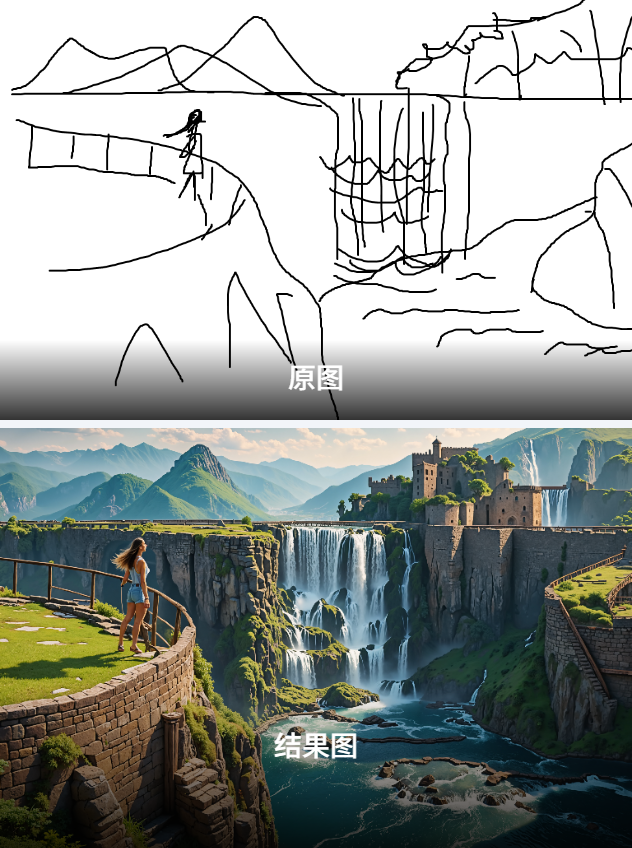
This "Doodle Art Master" workflow converts sketches into detailed illustrations with:
Sketch coloring & detailing
Two-phase generation (base + upscale)
Multi-style support via model switching
2. Core Models
Main Model:
WildCardX-XL FantasyControlNet: Scribble-optimized for SDXL
Upscaler:
4x-AnimeSharpfor anime-style
3. Key Nodes
Node | Function | Installation |
|---|---|---|
LatentUpscaleBy | 2x latent space enlargement | Built-in |
Image Comparer | Before/after visual comparison |
|
Dependencies:
Input sketch (e.g., 1152x648 PNG)
ae.sftVAE model required
4. Pipeline Stages
Stage 1: Sketch Processing
Load doodle image
Apply scribble ControlNet (0.85 strength)
Stage 2: Base Generation
dpmpp_sde_gpusampler (20 steps)Output 768x512 image
Stage 3: HD Refinement
2x latent upscale → 1536x1024
UltimateSD upscaling with redraw
5. I/O Specification
Inputs:
Hand-drawn sketch (B/W preferred)
Positive prompt (e.g., "woman on viewing platform")
Output:
HD illustration (saved to
ComfyUI)
6. Critical Notes
⚠️ Requirements:
8GB+ VRAM for SDXL
Adjust negative prompts for artifact control
🔧 Pro Tips:
Set
ControlNet stop_atto 0.65 for balanceEnable
tile overlapin UltimateSD for seamless upscale