From Flawed to Flawless: Harnessing the Power of SDXL Inpainting and Style Fusion
Unlock AI-powered image editing with this workflow combining SDXL inpainting and IPAdapter-based style fusion. Repaint, transfer styles, and optimize details with ease. Learn how to install, configure, and master this powerful tool. Discover the perfect blend of art and technology.
- Models
- Sdxl
- VRAM
- Medium VRAM (12–16GB)
- Reading Time
- 3 min
Workflow Overview
Unlock AI-powered image editing with this workflow combining SDXL inpainting and IPAdapter-based style fusion. Repaint, transfer styles, and optimize details with ease. Learn how to install, configure, and master this powerful tool. Discover the perfect blend of art and technology.
Content type: Workflow
Primary intent: Download
Required Models
- Sdxl
Required Nodes
- Ipadapter
- Inpaint
Setup Notes
- Install the required models before opening the workflow template.
- Recommended hardware: Medium VRAM (12–16GB).
1. Workflow Overview
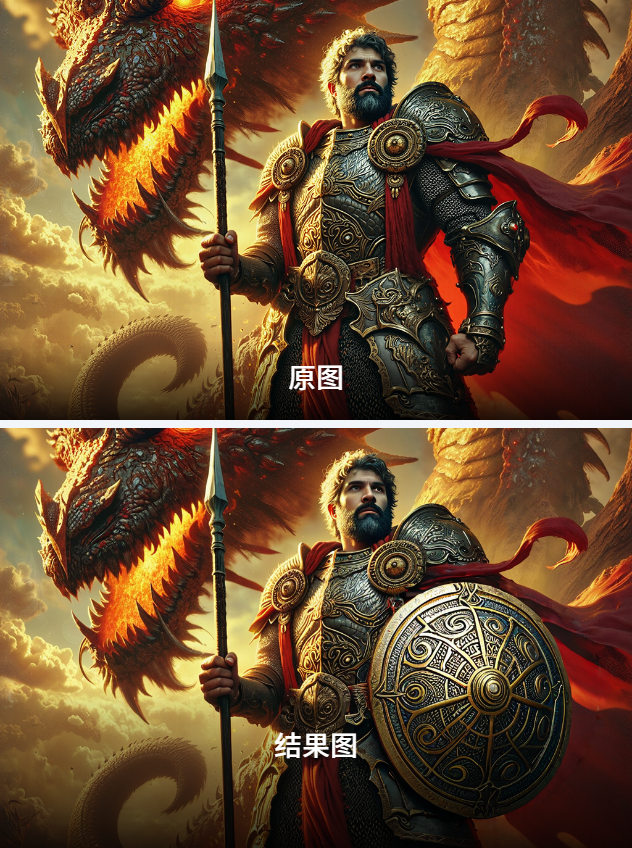
This workflow combines SDXL inpainting with IPAdapter-based style fusion. Key features:
Repaints masked areas of an input image.
Transfers style from a reference image via IPAdapter.
Uses Fooocus's inpainting model for detail coherence.
2. Core Models
SDXL (
万享XL_超写实摄影V8.4): Main text-to-image model.IPAdapter (
ip-adapter-plus_sdxl_vit-h): Injects reference image style.Fooocus Inpaint (
inpaint_v26.fooocus.patch): Optimizes local repairs.CLIP Vision (
CLIP-ViT-H-14-laion2B-s32B-b79K): Encodes reference image features.
3. Node Details
Key Nodes
LoadImage: Loads input image and mask (white=inpaint area).PrepImageForClipVision: Preprocesses reference image for IPAdapter.IPAdapterAdvanced: Blends style with main model (strength=1.0 by default).INPAINT_LoadFooocusInpaint: Loads Fooocus inpainting components.KSampler: Sampler (Euler, 30 steps) controls generation.
Installation
IPAdapter: Install via ComfyUI Manager (
IPAdapter Plus).Fooocus Models: Download manually from GitHub to
ComfyUI/models/inpaint.
Dependencies
IPAdapter Models: Download from HuggingFace.
CLIP Vision: Auto-downloads (requires internet).
4. Workflow Structure
Input Group
Nodes:
LoadImage,PrepImageForClipVision.
Model Loading
Nodes:
CheckpointLoaderSimple,IPAdapterModelLoader,INPAINT_LoadFooocusInpaint.
Inpainting Processing
Nodes:
VAEEncodeForInpaint,InpaintModelConditioning,INPAINT_ApplyFooocusInpaint.
Style Fusion
Node:
IPAdapterAdvanced.
Output Generation
Nodes:
KSampler,VAEDecode,SaveImage.
5. Inputs & Outputs
Inputs:
Required: Base image, mask, reference image.
Optional: Prompt (e.g.,
a bronze round shield...), seed (e.g.,506247113697241).
Output: Saved to
ComfyUIfolder.
6. Notes
Common Errors:
Missing IPAdapter files cause node failures.
Mask must match input image dimensions.
Optimization:
Reduce
KSamplersteps (e.g., 20) for speed.GPU with ≥12GB VRAM recommended.
Compatibility:
Requires ComfyUI ≥0.3.30 and matching IPAdapter plugin versions.