Unlock the Secrets of Ghibli Anime Style with FLUX Technology
Transform Your Photos into Ghibli-Style Anime with FLUX Technology! Discover how to preserve original content while adding Miyazaki's iconic colors and textures. Learn the advanced workflow now!
- Models
- FluxControlnetLora
- Key Nodes
- FaceDetailerControlnet
- VRAM
- Medium VRAM (12–16GB)
- Reading Time
- 3 min
Workflow Overview
Transform Your Photos into Ghibli-Style Anime with FLUX Technology! Discover how to preserve original content while adding Miyazaki's iconic colors and textures. Learn the advanced workflow now!
Content type: Workflow
Primary intent: Download
Required Models
- Flux
- Controlnet
- Lora
Required Nodes
- FaceDetailer
- Controlnet
Setup Notes
- Install the required models before opening the workflow template.
- Recommended hardware: Medium VRAM (12–16GB).
Workflow Overview
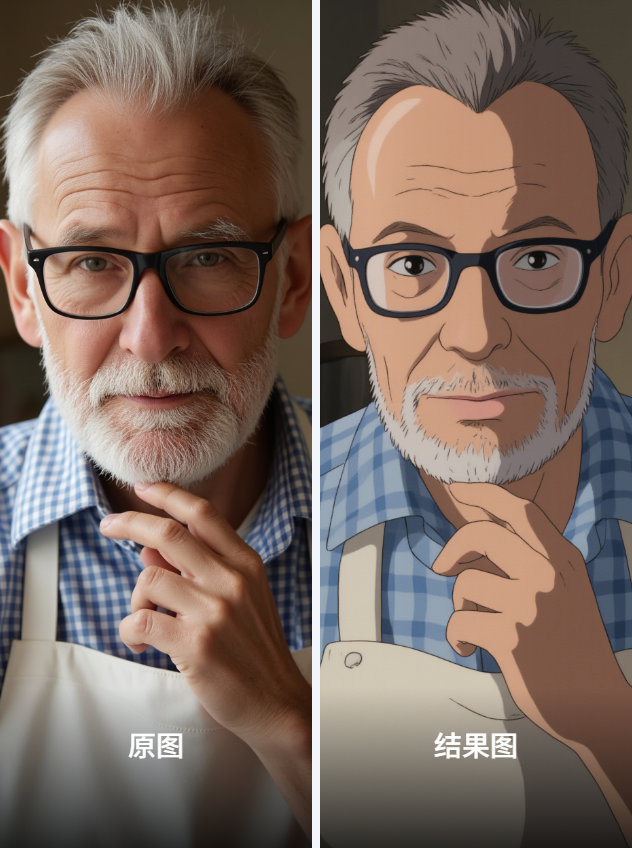
This is an advanced workflow that transforms ordinary images into Ghibli anime style using FLUX technology stack. It preserves original content while applying the distinctive colors and textures of Miyazaki's animations.
Core Models
Ghibli Style Main Model: "【动漫风格】_juaner-宫崎骏吉卜力工作室风格 flux_v2.0"
ControlNet Model: "FLUX.1-dev-ControlNet-Union-Pro-InstantX.safetensors"
Style LoRAs:
"复古旧漫_flux_1.0" (weight 0.6)
"明義浮梦_数字插画_F1&majicFlus_V2.0-F1" (weight 0.37)
"majicFlus复古美漫_V1" (weight 0.8)
PULID Model: "pulid_flux_v0.9.0.safetensors" (facial feature processing)
Key Components
ReduxAdvanced: Advanced downsampling
Downsample ratio 0.8
Uses area method to maintain aspect ratio
FaceDetailer: Facial detail enhancement
Resolution 768
20 steps euler sampling
CFG scale 5
easy imageColorMatch: Color matching
Uses adain and reinhard algorithms
Applied at different processing stages
ModelSamplingFlux: FLUX sampler
Sampling ratio 1.03
Base resolution 1024×1024
ApplyPulidFlux: Facial feature application
Combined with InsightFace analysis
Uses EVA-CLIP processing
Workflow Structure
Model Loading Group:
Loads UNET, VAE, ControlNet and CLIP models
Applies multiple style LoRAs
Input Processing Group:
Loads input image (e.g. "49395318-...png")
Image scaling and aspect ratio adjustment
ControlNet Processing Group:
Depth processing (DepthAnything)
Pose estimation (Openpose)
Control strength 0.4-0.8
Style Conversion Group:
Applies Redux downsampling
Uses FLUX guidance (strength 3.5)
Ghibli style prompts
Output Optimization Group:
Facial detail enhancement
Color matching adjustment
Final image output
Inputs and Outputs
Input Parameters:
Original image (recommended 768×1360)
Random seed (220489138248147)
Style prompt: "ghibli style,anime style"
Output Results:
Direct Ghibli-style output
Face-enhanced version
Color-optimized version
Original vs generated comparison
Notes
Requires at least 12GB VRAM
Includes multiple VRAM optimization nodes
Adjust Redux downsampling ratio (0.1-0.8) for style intensity
Facial LoRA weights adjustable (0.3-0.8)
Recommended input resolution near 1024×1024