Unlock Seamless Background Replacement and Lighting Control with This AI-Powered Workflow
Unlock advanced background replacement and lighting control with this workflow! Discover how to seamlessly integrate custom backgrounds and light sources into your images using RealisticVision V6.0, ICLight, and more. Learn and enhance your editing skills now!
- VRAM
- Low VRAM (≤8GB)
- Reading Time
- 4 min
Workflow Overview
Unlock advanced background replacement and lighting control with this workflow! Discover how to seamlessly integrate custom backgrounds and light sources into your images using RealisticVision V6.0, ICLight, and more. Learn and enhance your editing skills now!
Content type: Workflow
Primary intent: Download
Setup Notes
- Install the required models before opening the workflow template.
- Recommended hardware: Low VRAM (≤8GB).
1. Workflow Overview
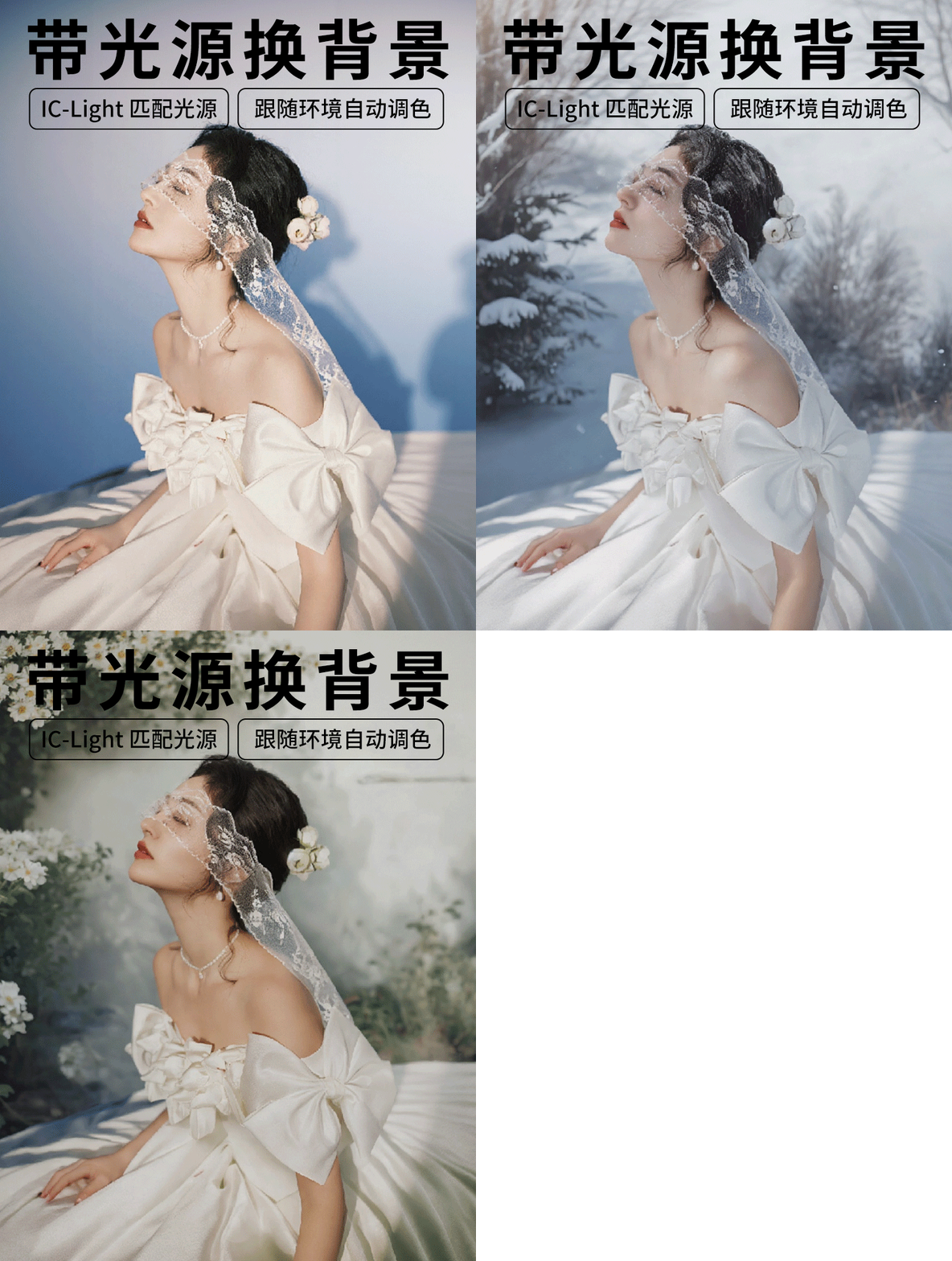
This workflow specializes in background replacement and light adjustment, with key features:
Remove original background (e.g., portrait segmentation).
Replace with custom background (e.g., snowy scene).
Add controllable light sources (e.g., top white light) for scene blending.
Optimize lighting consistency via ICLight model.
Use Cases: Portrait retouching, e-commerce product editing, virtual scene compositing.
2. Core Models
Model/Component | Function | Source File |
|---|---|---|
RealisticVision V6.0 | Base text-to-image model |
|
ICLight Model | Light condition control |
|
RMBG-2.0 | Auto background removal | Built-in |
3. Key Nodes
Node Name | Function | Installation |
|---|---|---|
easy imageRemBg | Auto background removal | Install |
BackgroundScaler | Resize background to match foreground | Same as above |
LightSource | Add custom light (position/color) | Install |
ICLightConditioning | Adjust latent space lighting | Install |
DetailTransfer | Blend details (e.g., soft light) | Built-in |
4. Workflow Groups
Input Group
Input: Source image (e.g.,
image.png, 976x1424).Key Nodes:
LoadImage→easy imageRemBgfor mask generation.
Preprocessing Group
Background Handling:
Scale background via
BackgroundScaler.
Light Addition:
Configure
LightSource(e.g.,Top Light, color#FFFFFF).
Light Optimization Group
ICLight Processing:
Load model via
LoadAndApplyICLightUnet.Inject light data into latent space with
ICLightConditioning.
Generation & Output Group
Sampling & Decoding:
KSamplerwithdpmpp_2m_sde(25 steps, CFG=0.9).VAEDecodefor final image.
Detail Fusion:
Blend foreground/background via
DetailTransfer(soft_lightmode).
5. Inputs & Outputs
Required Inputs:
Foreground image: Clear subject (e.g., portrait), simple background preferred.
Prompts:
Positive: Target background (e.g.,
In the snow).Negative: Exclude artifacts (e.g.,
nsfw).
Light parameters: Position, color, intensity (e.g., top light, intensity=2).
Output:
Composited image with lighting, preview via
PreviewImage.
6. Notes
Hardware:
≥8GB VRAM (RTX 3060+ recommended) due to ICLight and RealisticVision models.
Troubleshooting:
Incomplete masking: Adjust
easy imageRemBgthreshold or manually edit mask.Unnatural lighting: Tweak
ICLightConditioningweight (default=0.18215).
Extensibility:
Replace
RealisticVisionwith other models (e.g.,JuggernautXL) for style variation.