Unlocking Realistic Motion Retargeting: A Deep Dive into Wan2.1-Fun-Control
Discover how to retarget motion from a source video to a target character using the Wan2.1-Fun-Control model, a powerful tool for creating realistic character animations. Learn the workflow, key technologies, and core models involved in this innovative process.
Workflow Overview
Discover how to retarget motion from a source video to a target character using the Wan2.1-Fun-Control model, a powerful tool for creating realistic character animations. Learn the workflow, key technologies, and core models involved in this innovative process.
Content type: Workflow
Primary intent: Download
Required Models
- Wan2.1
Setup Notes
- Install the required models before opening the workflow template.
- Recommended hardware: Low VRAM (≤8GB).
1. Workflow Overview
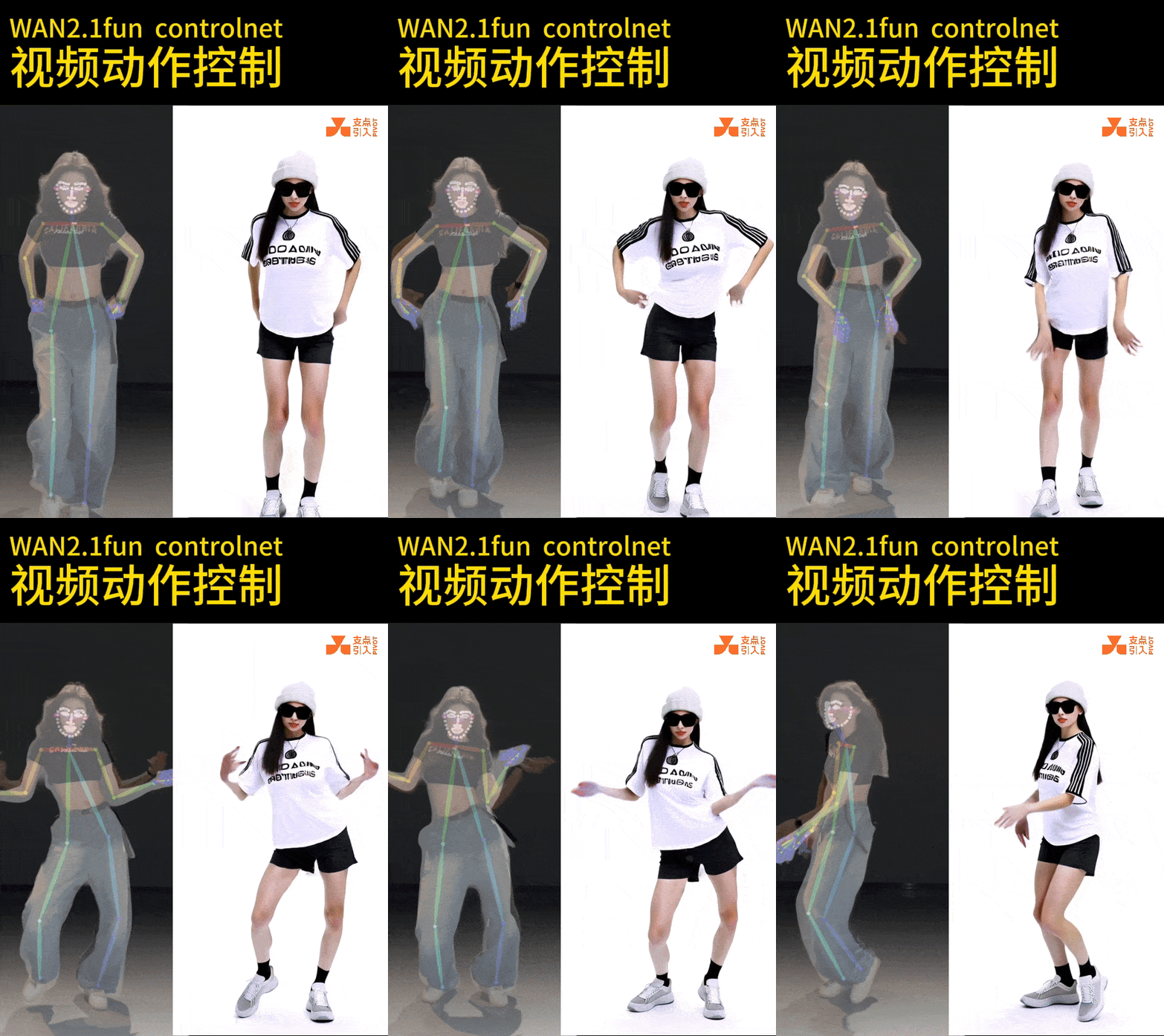
Purpose: Motion retargeting from a source video to a target character using Wan2.1-Fun-Control model.
Key Tech:
Pose Extraction:
DWPreprocessordetects keypoints from input video.Multimodal Control: CLIP vision + T5 text + depth maps (
DepthAnythingPreprocessor).Temporal Coherence:
WanFunControlToVideogenerates frame-consistent videos.
2. Core Models
Model Name | Function |
|---|---|
Wan2.1-Fun-Control-14B | Base motion control model (14B params, FP8 optimized). |
umt5-xxl_fp8_e4m3fn_scaled | Text encoder for prompts (e.g., negative prompts to filter bad frames). |
depth_anything_vitl14 | Depth preprocessor for spatial consistency. |
3. Key Nodes
3.1 Input Processing
VHS_LoadVideo:
Loads input video (e.g.,
5月12日 0.8.mp4), extracts frames (25FPS default).
LoadImage:
Loads target character image (e.g.,
00088-3677135724.png).
3.2 Motion Analysis
DWPreprocessor:
Extracts pose keypoints (using
yolox_l.onnxanddw-ll_ucoco_384).
DepthAnythingPreprocessor:
Generates depth maps for background alignment.
3.3 Video Generation
WanFunControlToVideo:
Key params: 832x480 output, 81 frames (~3.24s), CFG=1.0.
Inputs: Pose keypoints + CLIP features + text conditioning.
KSampler:
Settings: 20 steps, Euler sampler, fixed seed (198).
3.4 Post-Processing
SkipLayerGuidanceWanVideo:
Skips UNet layers (9,10) at 0.2 strength for detail/fluency balance.
WanVideoEnhanceAVideoKJ:
Reduces flickering (strength=0.2).
4. Workflow Structure
Stage | Key Nodes | Function |
|---|---|---|
Input Prep | VHS_LoadVideo + LoadImage | Loads video and target image. |
Motion Extract | DWPreprocessor → DepthAnything | Extracts poses and depth maps. |
Conditioning | CLIPTextEncode + CLIPVisionEncode | Encodes text/visual conditions. |
Video Gen | WanFunControlToVideo → KSampler | Renders motion-retargeted frames. |
Output Export | VHS_VideoCombine | Final video (H.264, CRF=15). |
5. Inputs & Outputs
Inputs:
Source video (MP4, 25FPS recommended).
Target character image (PNG/JPG, transparent background preferred).
Optional text prompts (style control).
Output:
Motion-retargeted video (default 832x480, 25FPS).
6. Notes
Hardware:
16GB+ VRAM (RTX 4080+ recommended for 14B model).
Enable FP8 optimization (
fp8_e4m3fn) for lower VRAM usage.
Dependencies:
Download
Wan2.1-Fun-Control-14Banddepth_anything_vitl14.pthmanually.
Troubleshooting:
Reduce flickering: Increase
KSamplersteps (20→30) or lowerSkipLayerGuidancestrength (0.2→0.1).Resolution errors: Match video/image aspect ratios (e.g., 512x512).