Cyberpunk Art Revolution: AI-Generated Covers with Style
Generate stunning cyberpunk art covers with text rendering! This workflow combines image generation, captioning, upscaling, and typography effects. Learn how to create futuristic art with Stable Diffusion, Meta-Llama-3, and more. Try it now!
- Use Case
- Text In Image
- Best For
- Text In Image
- Key Nodes
- Upscaler
- VRAM
- Medium VRAM (12–16GB)
- Reading Time
- 3 min
Workflow Overview
Generate stunning cyberpunk art covers with text rendering! This workflow combines image generation, captioning, upscaling, and typography effects. Learn how to create futuristic art with Stable Diffusion, Meta-Llama-3, and more. Try it now!
Content type: Workflow
Primary intent: Download
Required Models
- Flux
- Sd
Required Nodes
- Upscaler
Setup Notes
- Install the required models before opening the workflow template.
- Recommended hardware: Medium VRAM (12–16GB).
- Use the download button above to import the workflow JSON into ComfyUI.
1. Workflow Overview
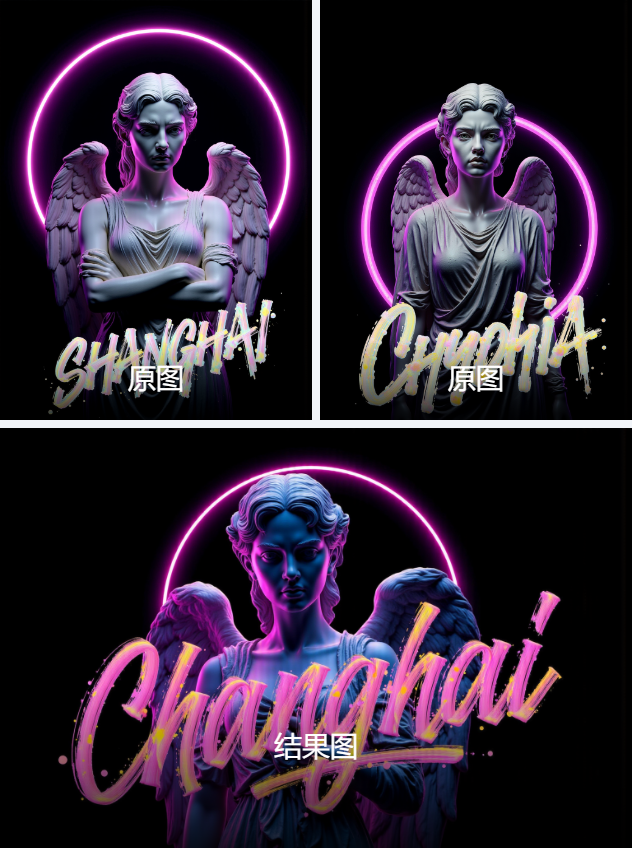
This workflow generates cyberpunk-style art covers with integrated text rendering, combining image generation, captioning, upscaling, and typography effects. Key features:
Reverse-engineers image descriptions using Meta-Llama-3.
Generates cyberpunk images (Stable Diffusion + Flux LoRAs).
Adds artistic fonts (e.g., "splash brush letters").
Enhances resolution via UltimateSDUpscale (1024x1024).
Core Models:
Stable Diffusion (F.1 Base): Main generation model.
Meta-Llama-3.1-8B: Image captioning.
R-ESRGAN_4x+ Anime6B: Upscaling.
Flux LoRAs: Neon/mechanical style enhancements.
2. Key Components
Critical Nodes:
Joy_caption / Joy_caption_two:
Uses Meta-Llama-3 to generate image descriptions.
Install via ComfyUI Manager (
unsloth/Meta-Llama-3.1-8B).
UltimateSDUpscale:
Upscales images with tile-based processing.
Requires
R-ESRGAN_4x+ Anime6Binmodels/upscale_models.
LoraLoader:
Loads style LoRAs like:
Flux.1_Cyber-Electronic: Mechanical textures.AsurFont02-F.1: Calligraphy font effects.
ModelSamplingFlux:
Optimizes SD sampling for finer details.
Dependencies:
Flux models (download from LibLibAI to
models/loras).
3. Workflow Structure
Three Groups:
Image Captioning (Group 35):
Input: Source image (e.g.,
output (26).png).Output: Bilingual text description.
Image Generation (Group 34):
Input: Prompt, seed (e.g.,
48473066447724), resolution (1024x1536).Output: Initial cyberpunk image with fonts.
Upscaling (Group 33):
Input: Low-res image.
Output: 1024x1024 HD image (preserves font details).
4. Input & Output
Input Parameters:
Image: Source file (PNG/JPG).
Prompt: E.g., "Angel statue with neon lights, splash brush letters."
Seed: Fixed value for reproducibility.
Resolution: Customizable (e.g., 1024x1536).
Output:
Final image (PNG) with cyberpunk style and typography.
Intermediate results can be compared via
Image Comparer.
5. Notes
VRAM: ≥12GB recommended (UltimateSDUpscale tile size: 32x32).
Compatibility:
Flux LoRAs require
F.1base model.Install
Impact Packandrgthreeextensions if nodes are missing.
Fonts: Adjust
AsurFont02-F.1weight (default: 1.2) for intensity.