Unleash Realistic Product Placements with AI-Powered Star Migration
Automate product-to-model mapping with the 'Star Migration' workflow, combining Stable Diffusion, Florence-2, and SAM2 for realistic results. Discover how to streamline your product visualization process with this AI-powered workflow.
- Models
- ControlnetSd
- Key Nodes
- ControlnetInpaint
- Reading Time
- 3 min
Workflow Overview
Automate product-to-model mapping with the 'Star Migration' workflow, combining Stable Diffusion, Florence-2, and SAM2 for realistic results. Discover how to streamline your product visualization process with this AI-powered workflow.
Content type: Workflow
Primary intent: Download
Required Models
- Controlnet
- Sd
Required Nodes
- Controlnet
- Inpaint
Setup Notes
- Install the required models before opening the workflow template.
1. Workflow Overview
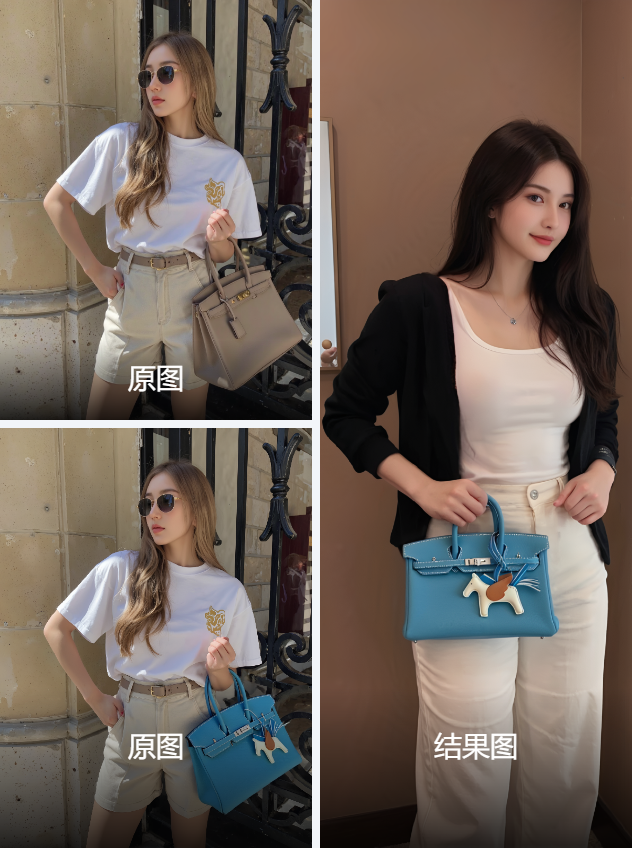
This workflow, named "Star Migration", intelligently maps products (e.g., clothing, accessories) onto models while preserving poses and backgrounds. It combines:
Stable Diffusion: Realistic generation (
majicMIX realistic_v7).Florence-2: Visual understanding of product images.
SAM2: Precise segmentation of products/models.
ControlNet & FluxGuidance: Controls structural details.
Key Features:
Auto-align products to models (wearing/holding).
Background removal via BiRefNetUltra/SAM2.
Optional upscaling (UltimateSDUpscale).
2. Key Components
Nodes:
Input & Preprocessing:
LoadImage: Load product/model images.ImageResize+: Standardize resolution (e.g., 1600x1600).
Visual Understanding:
Florence2Run: Analyzes product images.Sam2Segmentation: Segments product regions.
Generation & Inpainting:
KSampler: UsesEuler(Steps=20, CFG=8).InpaintStitch: Blends products onto models.
Output:
UltimateSDUpscale: 2x upscaling (optional).SaveImage: Saves final results.
Dependencies:
Download
Florence-2-largeandSAM2models manually.Install plugins via ComfyUI Manager:
ComfyUI-Florence2,ComfyUI-Inpaint-CropAndStitch.
3. Workflow Structure
Groups:
Product-to-Model Mapping:
Input: Product image, model photo, prompts (e.g., "best,4K").
Segmentation:
Uses SAM2/BiRefNetUltra for masking.
Upscaling (Optional):
Enabled via
UltimateSDUpscale.
4. Inputs & Outputs
Inputs:
Required:
Product image (transparent background or masked).
Model photo (with/without background).
Optional: Seed, resolution, sampler settings.
Output:
Final image (PNG) with product naturally fitted.
5. Notes
Issues:
GPU OOM: Reduce resolution or disable upscaling.
Model errors: Verify Florence-2/SAM2 paths.
Optimization:
Use FP16 for Florence-2/SAM2 if GPU supports.
Increase
KSamplersteps (30+) for complex products.