From Abstract to Stunning: Mastering AI-Driven Image Generation with LoRA Style Control and Captioning
Transform Images with AI: Style Transfer, Detail Enhancement & Multilingual Support. Discover how to generate stylized images with LoRA and text-to-image models.
- Models
- Lora
- VRAM
- Low VRAM (≤8GB)
- Reading Time
- 4 min
Workflow Overview
Transform Images with AI: Style Transfer, Detail Enhancement & Multilingual Support. Discover how to generate stylized images with LoRA and text-to-image models.
Content type: Workflow
Primary intent: Download
Required Models
- Lora
Setup Notes
- Install the required models before opening the workflow template.
- Recommended hardware: Low VRAM (≤8GB).
- Use the download button above to import the workflow JSON into ComfyUI.
1. Workflow Overview
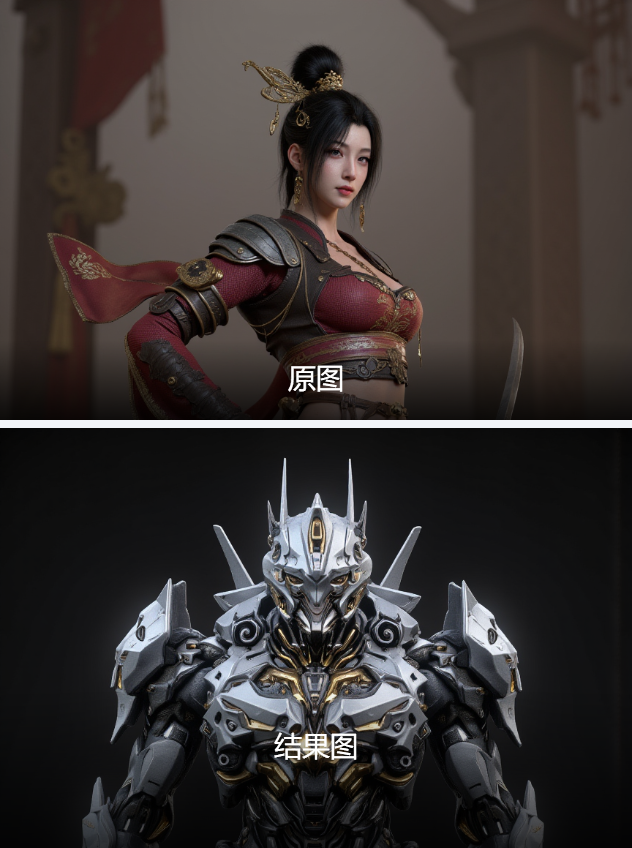
This workflow is designed for image padding and style enhancement, integrating image captioning, LoRA style control, and text-to-image generation. Key uses:
Style Transfer: Generate stylized images based on reference input (e.g., abstract art).
Detail Enhancement: Apply LoRAs (e.g.,
Anime-Chinese Beauty FLUX_1.0) for specific styles.Multilingual: Supports mixed Chinese/English prompts.
Core Models:
F.1-fp8 11G: Base model (VRAM-optimized).
Meta-Llama-3.1-8B: Image captioning.
CatPaw_Anime-ChineseBeauty_FLUX_1.0: Style LoRA.
2. Key Components
Critical Nodes:
Joy_caption_two:
Uses Meta-Llama-3 to generate image descriptions (e.g., abstract line art).
Install via ComfyUI Manager (
unsloth/Meta-Llama-3.1-8B-Instruct).
LoraLoader:
Loads style LoRAs (e.g.,
Anime-Chinese Beauty), adjustable strength (default: 0.8).
CLIPTextEncodeFlux:
Merges user prompts (e.g.,
miluo_cjsj, cloth) with captions for conditioning.
KSampler:
Settings:
Steps: 20
Sampler:
eulerSeed: Random (can fix to
6368394736575).
Dependencies:
Download
F.1-fp8andae.sftVAE toComfyUI/models.
3. Workflow Structure
Input Group (Group 2):
Load image (e.g.,
@rawandrendered.jpg) → Caption → Translate.
Generation Group (Group 1):
Fuse prompts + captions → Apply LoRA → Generate image (600x800).
Output:
Decode latent → Preview/save image.
Key Parameters:
Resolution: Set via
EmptyLatentImage(default: 600x800).LoRA Strength: Adjust via
ReroutePrimitive(default: 0.8).
4. Input & Output
Input Parameters:
Image: JPG/PNG (e.g., 1440x1440 abstract art).
Text Prompt: Optional keywords (e.g.,
miluo_cjsj, cloth).LoRA: Select from preset styles.
Output:
Stylized image (e.g., Chinese anime style) in
PreviewImage.Example caption:
"Digital artwork with abstract colorful lines, deep blue background, reflective effects..."
5. Notes
VRAM: ≥8GB required (FP8 optimization).
Troubleshooting:
Missing
Joy_caption_two? Installcomfyui_slk_joy_caption_two.Match image size to
EmptyLatentImage(e.g., 600x800).
Style Control:
Adjust LoRA strength (0-1) for intensity.
Modify CFG scale (default: 3.5) in
CLIPTextEncodeFlux.