The Secret to Realistic Product Placement: A Flux Kontext Pro Tip
Boost your Flux Kontext skills! Learn how to accurately size objects in multi-image references with a simple prompt tweak. Get the perfect proportions with this quick tip!
- Use Case
- Image Editing
- Best For
- Image Editing
- Models
- Flux KontextFlux
- Reading Time
- 2 min
Workflow Overview
Boost your Flux Kontext skills! Learn how to accurately size objects in multi-image references with a simple prompt tweak. Get the perfect proportions with this quick tip!
Content type: Workflow
Primary intent: Tutorial
Required Models
- Flux Kontext
- Flux
Setup Notes
- Install the required models before opening the workflow template.
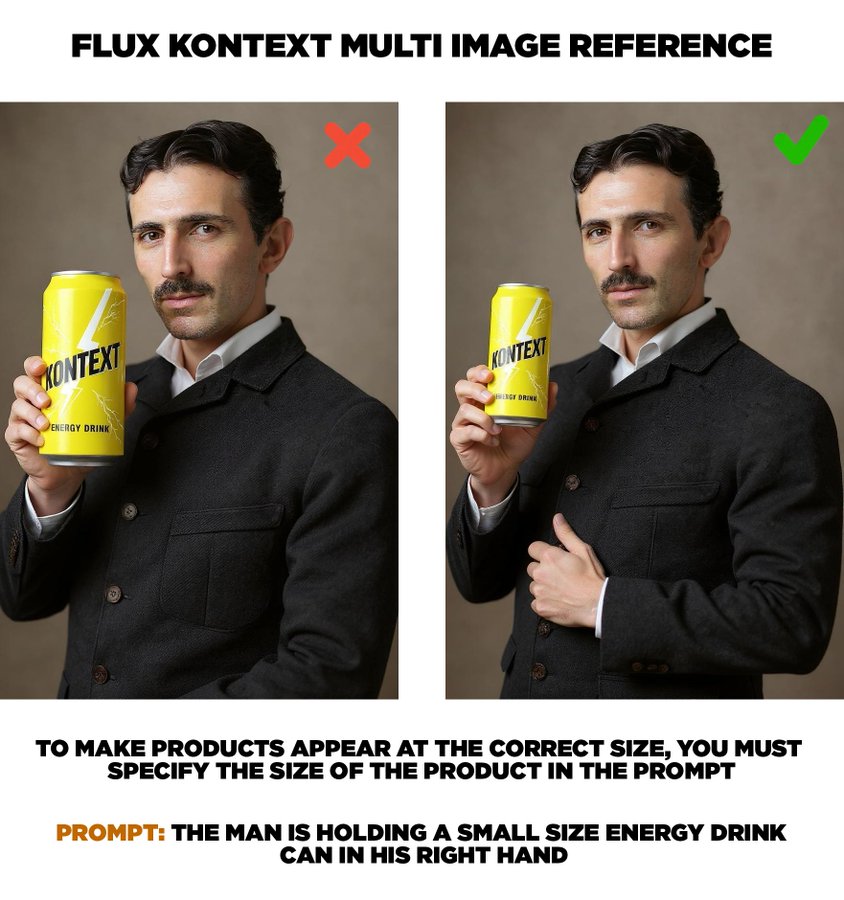
Quick tip for anyone using multi image reference with Flux Kontext. If you have someone holding a product, you need to specify how big the product needs to be so that it looks accurate in their hand/s. By default the products appear massive from what I’ve noticed (unless you intentionally want the product to look huge).
Incorrect Prompt: The man is holding an energy drink can in his right hand
Optimized Prompt: The man is holding a small size energy drink can in his right hand
A small size can to me still looks medium so if I wanted it even smaller maybe I can say very small can in the prompt.